RevDroid Documentation
AI-assisted Android APK security analysis for bug bounty hunters. Decompile and scan APKs locally, then let an AI agent reason over the results to build exploit chains — without the APK ever leaving your machine.
Overview
RevDroid is a full-stack, self-hostable platform that pairs a local analysis agent with a web dashboard and an AI hunt agent. It is built for bug bounty hunters, mobile pentesters, and AppSec engineers who need to go from an APK to a credible, submittable finding quickly.
The product ships as full source for three independent components you run yourself:
agent/
A local Node/Express agent that runs on your machine, wraps ADB, ingests APKs, and runs the 12-phase static analysis pipeline. Listens on 127.0.0.1:8071.
backend/
A Node/Express + MongoDB API for Google sign-in, JWT sessions, and the AI tool-calling loop over OpenRouter. Default port 8070.
frontend/
A Next.js 16 / React 19 dashboard (Tailwind v4 + DaisyUI) for projects, scans, findings, AI chat, and device control. Default port 3000.
How it works
Pair the local agent
Start the agent on your machine. It generates a one-time pairing token; you paste it into the dashboard so the browser can talk to the agent over localhost.
Add an APK
Upload an APK file directly, or pull an installed package straight off a connected Android device via ADB. APKs are de-duplicated by SHA-256.
Run a scan
The agent unpacks the APK and runs 12 analysis phases, streaming each result to the dashboard live over Server-Sent Events.
Hunt with the AI agent
Open the per-project AI chat. It reads your scan data through the agent, proposes multi-step exploit chains, and tracks verification steps — all while the APK stays on your machine.
Architecture
The browser is paired with both the cloud backend and the local agent. When the AI needs data about an APK, the backend emits a tool call, the browser executes it against the local agent, and posts the result back — so analysis data reaches the LLM without the APK being uploaded.
Prerequisites
Install these before you begin. Static analysis needs Java and the Android platform-tools; the AI features need a MongoDB instance and provider keys.
| Requirement | Used by | Notes |
|---|---|---|
| Node.js ≥ 18 | all three apps | LTS recommended. Verify with node -v. |
| Java (JDK) | agent | Required by apktool and keytool. Verify with java -version. |
| Android platform-tools | agent | adb on your PATH, or set ADB_PATH. Needed for device features and pulling installed APKs. |
| MongoDB | backend | Local install or a hosted connection string (e.g. MongoDB Atlas). |
| Google OAuth client | backend | Client ID + secret from the Google Cloud Console for sign-in. |
| OpenRouter API key | backend | For the AI agent. Create one at openrouter.ai/keys. Billed by usage — see AI model & costs. |
Installation — 1 · Local agent
You will run three processes. The agent and backend should be up before you use the dashboard.
cd agent
npm install        # also downloads pinned tools (apktool) with sha256 verification
npm start
On first boot the agent generates a pairing token, prints it in the terminal, and stores it at ~/.revdroid/agent.json (file mode 600). It listens on http://127.0.0.1:8071 and accepts browser requests only from the dashboard origin. Keep this terminal open — you'll copy the token in step 4.
.env file. All of its settings are optional environment variables with sensible defaults — see Agent variables.Installation — 2 · Backend
cd backend
npm install
cp .env.example .env      # then edit .env — see Configuration below
npm run dev               # or: npm start
Open backend/.env and fill in every value. At minimum you must set MONGO_URI, a strong JWT_SECRET, the Google OAuth pair, and OPENROUTER_API_KEY.
JWT_SECRET is missing, a known placeholder, or shorter than 32 characters. Generate a strong value: openssl rand -hex 32.Installation — 3 · Frontend
cd frontend
npm install
cp .env.example .env.local   # sets NEXT_PUBLIC_API_URL=http://localhost:8070
npm run dev                  # http://localhost:3000
The dashboard is now available at http://localhost:3000.
Installation — 4 · Pair & sign in
Sign in
Open the dashboard and sign in with Google. On success the backend issues a 7-day JWT that the frontend stores in localStorage.
Pair the agent
Click Pair Agent in the sidebar. Paste the token the agent printed on first boot. The agent URL defaults to http://127.0.0.1:8071. The pairing is stored in localStorage.
Create a project
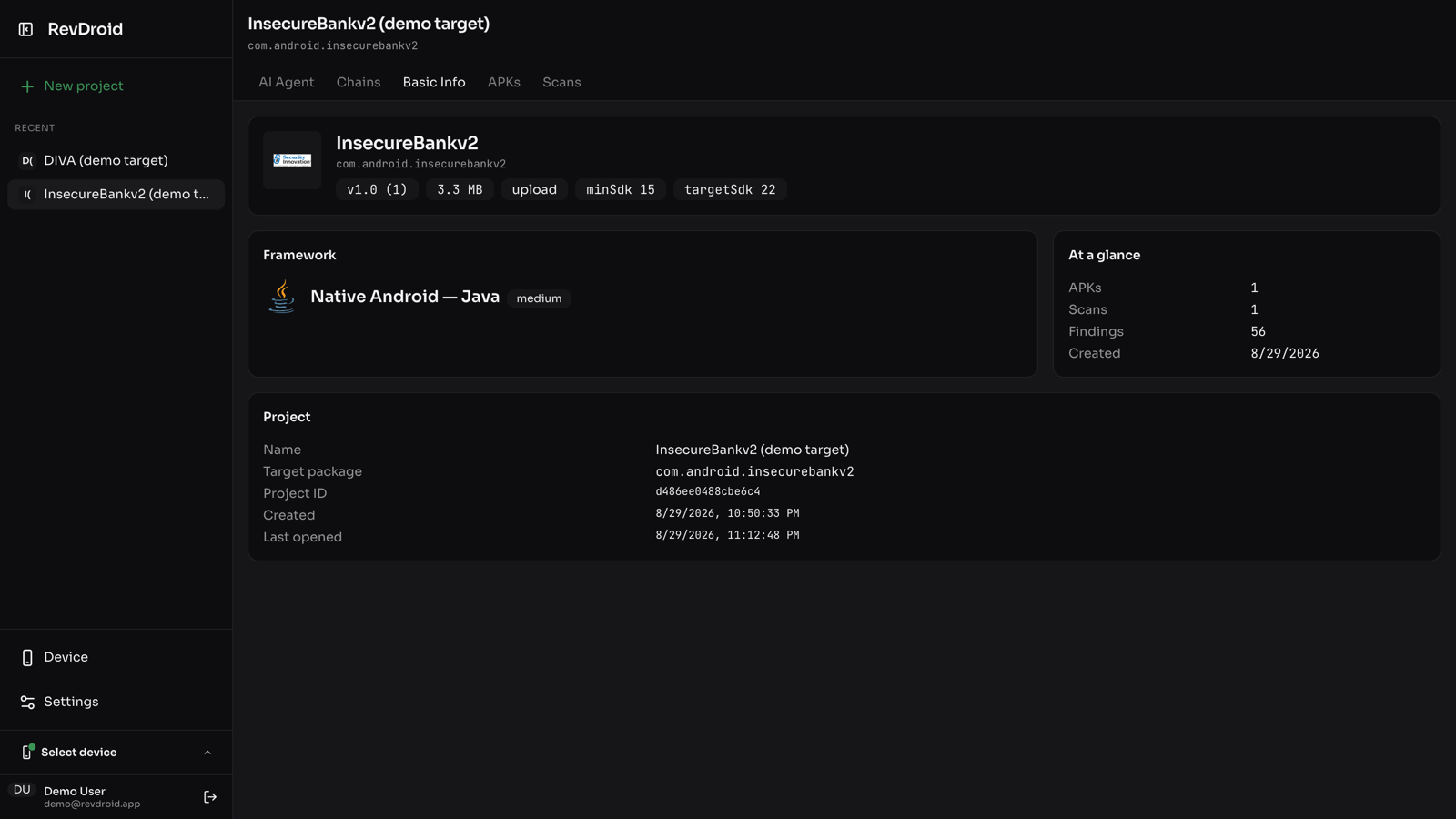
Create your first project, then upload an APK or pull one from a connected device to begin.
Configuration — Backend variables
Set these in backend/.env (copy from backend/.env.example).
| Variable | Required | Description |
|---|---|---|
PORT | no | API listen port. Default 8070. |
MONGO_URI | yes | MongoDB connection string, e.g. mongodb://localhost:27017/revdroid. |
JWT_SECRET | yes | Random string ≥ 32 chars. The server will not start without a strong value. |
JWT_EXPIRES_IN | no | Token lifetime. Default 7d. |
GOOGLE_CLIENT_ID | yes | Google OAuth client ID. |
GOOGLE_CLIENT_SECRET | yes | Google OAuth client secret. |
GOOGLE_CALLBACK_URL | yes | OAuth redirect, e.g. http://localhost:8070/auth/google/callback. Must match the Google console. |
FRONTEND_URL | yes | Dashboard origin used for post-login redirect, e.g. http://localhost:3000. |
OPENROUTER_API_KEY | yes* | Key for the AI agent. *Required for AI chat; static scanning works without it. |
AI_MODEL | no | OpenRouter model slug. Default anthropic/claude-sonnet-4.5. |
Configuration — Agent variables
All optional. Set them in your shell before npm start if the defaults don't fit.
| Variable | Default | Description |
|---|---|---|
PORT | 8071 | Local listen port. |
HOST | 127.0.0.1 | Bind address. Do not expose this to your network. |
ADB_PATH | adb | Full path to the adb binary if it isn't on PATH. |
JAVA_PATH | java | Full path to the java binary if it isn't on PATH. |
ALLOWED_ORIGINS | http://localhost:3000,http://127.0.0.1:3000 | Comma-separated CORS allowlist. Add your deployed dashboard origin here. |
Rotate the pairing token at any time (you'll need to re-pair):
cd agent
node src/index.js --rotate-token
Configuration — Frontend variables
| Variable | Required | Description |
|---|---|---|
NEXT_PUBLIC_API_URL | yes | Base URL of the backend API, e.g. http://localhost:8070. |
Configuration — AI model & costs
The AI agent calls an LLM through OpenRouter using your own API key. Set AI_MODEL to any OpenRouter model slug; the default is anthropic/claude-sonnet-4.5. You can switch to cheaper models such as anthropic/claude-haiku-4.5, openai/gpt-4o-mini, or deepseek/deepseek-chat.
Using RevDroid — Run a scan
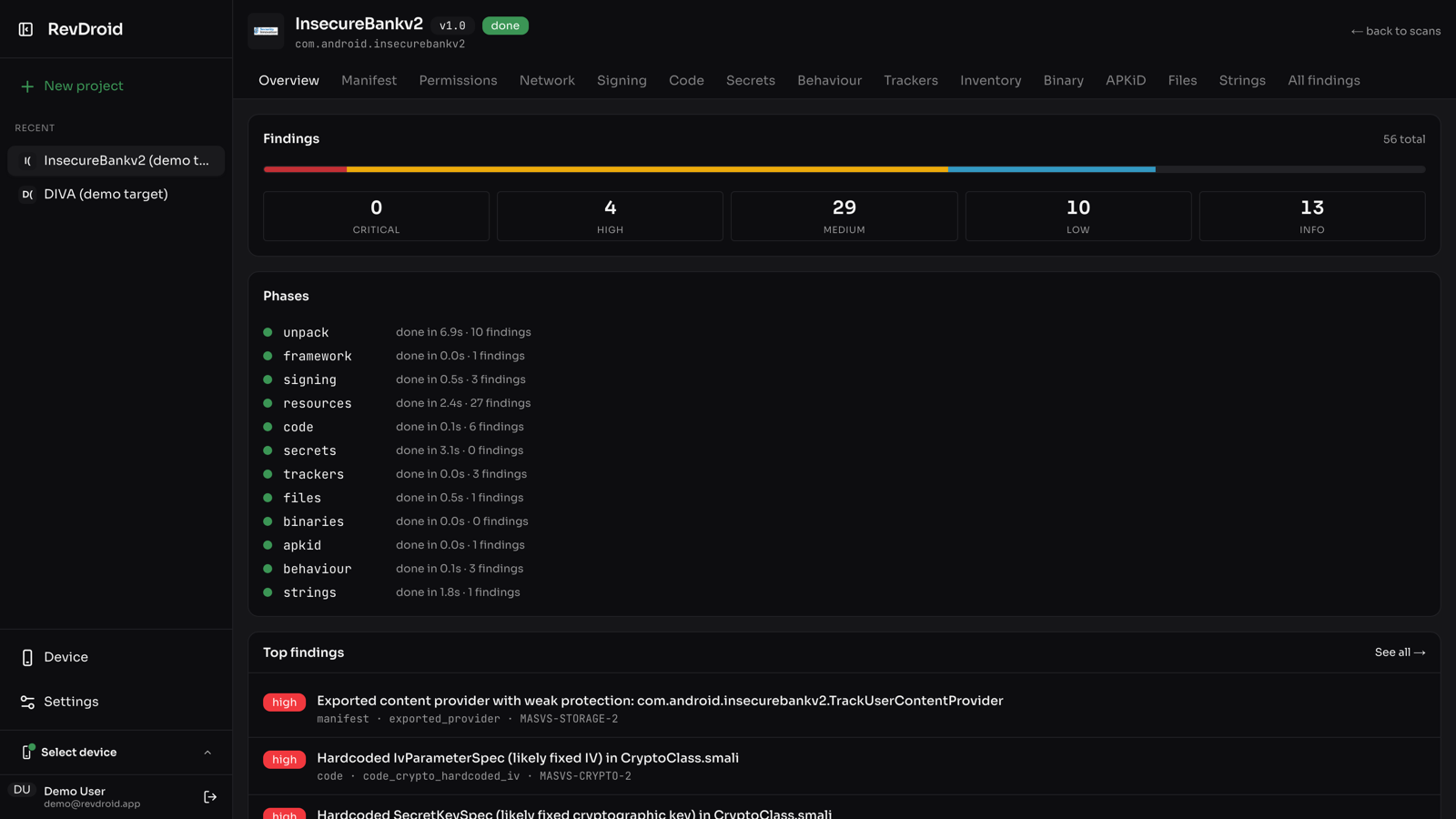
Inside a project, add an APK (upload a file or pull one from a device), then click Run scan. The agent executes the pipeline and streams each phase to the UI in real time:
- unpack —
apktool dinto smali, resources, andAndroidManifest.xml - framework — detect Flutter, React Native, Xamarin, Unity, or native (+ ABIs)
- signing — certificate chain and signature algorithm analysis
- resources — sensitive files, config bundles, and URLs in assets/res
- code — weak crypto, SSL/TLS bypass, insecure RNG, WebView misconfig, reflection, SQLi patterns, debug logging
- secrets — hardcoded API keys and credentials (AWS, GCP, Stripe, Slack, GitHub, Twilio, private keys, OAuth tokens)
- trackers — 40+ known third-party SDKs
- files — inventory by type, suspicious files, oversized files
- binaries — ELF mitigations (NX, PIE, RELRO, stack canary, stripped, RPATH)
- apkid — commercial packers, obfuscators (ProGuard/R8/DexGuard), anti-debug stubs
- behaviour — high-signal Android behaviours (IMEI/IMSI, contacts, sensors, encryption, native loads)
- strings — extract and dedupe smali + binary strings into a searchable index
Using RevDroid — Read findings
Each scan opens to an overview with a severity chart and per-phase status, plus dedicated tabs: findings (filterable), manifest, permissions, network & deep-links, code, secrets (reveal/copy), signing, behaviour, trackers, file inventory, binaries, APKiD, and strings. Findings update live as phases complete.
Using RevDroid — AI hunt agent
Open the AI chat for a project and ask it to hunt, e.g. "What's the most promising exploit chain here?" The agent runs a multi-turn tool-calling loop (up to 25 hops) and can call these read-only tools against your local agent: get_project_summary, list_scans, get_scan_summary, list_findings, get_finding, get_manifest_summary, get_framework, get_secrets, search_strings, and read_smali_file.
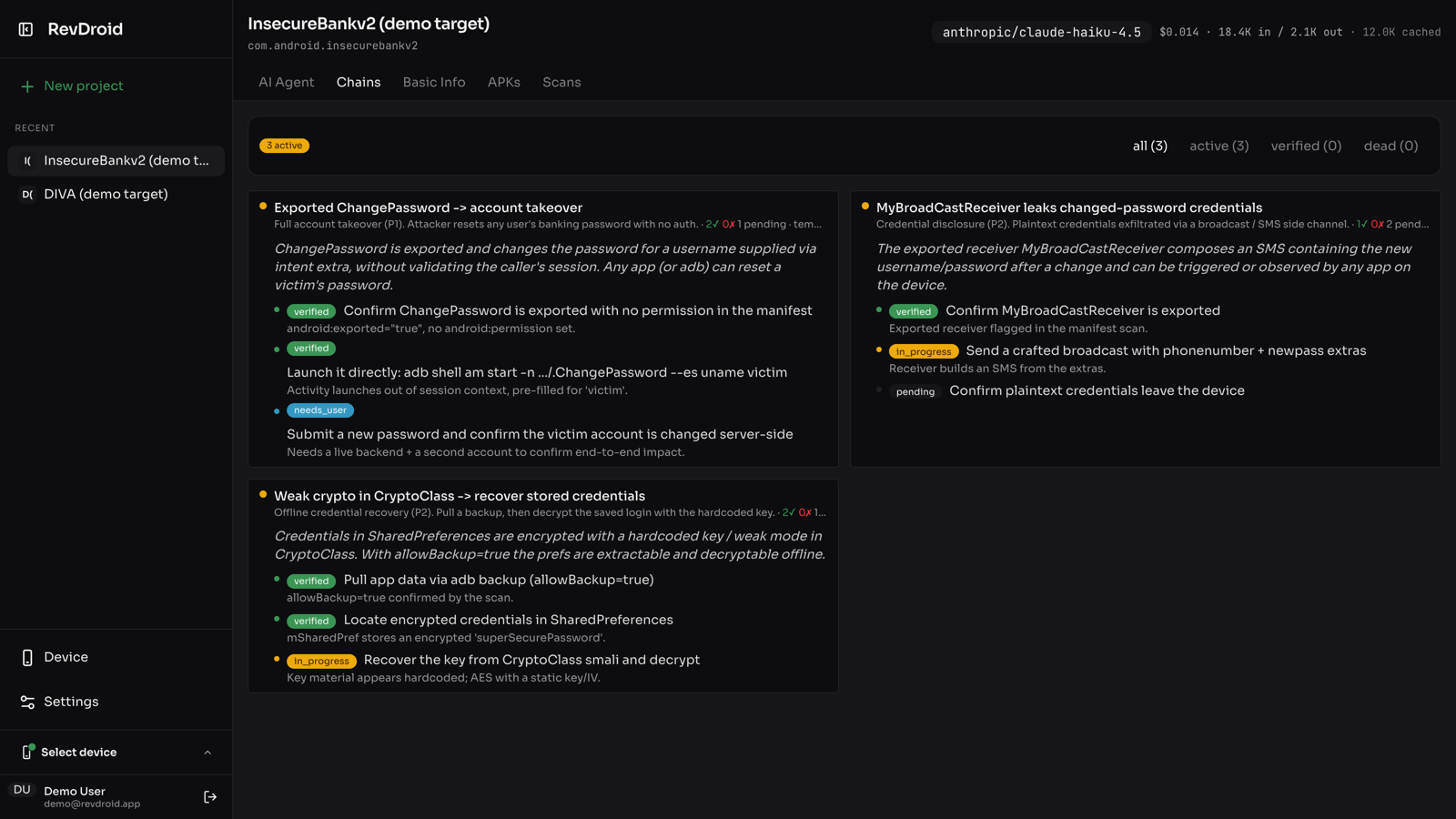
Exploit chains. The agent tracks bug-bounty hypotheses as multi-step chains (hypothesis → steps with status → impact), seeded from 10+ canonical Android templates such as open Firebase RTDB, unrestricted Maps key, WebView JS-interface RCE, deep-link account takeover/IDOR, exported-provider disclosure, JWT weakness, SSRF via image proxy, and purchase race conditions. Each conversation shows hop count, model, and running cost.
Using RevDroid — Device tooling
With a device connected over USB or Wi-Fi, the agent unlocks: device info and security posture (bootloader, verified boot, SELinux, debuggable), an installed-apps browser with icons, a live screen view with remote input (tap / swipe / key), and the ability to pull an installed APK straight into a project. Connect over Wi-Fi from the dashboard by entering the device host and port (default 5555).
Feature reference
Local-first analysis
All decompilation and scanning run on the agent. APK bytes never leave your machine.
12-phase static pipeline
Unpack, framework, signing, resources, code, secrets, trackers, files, binaries, APKiD, behaviour, strings — streamed live.
Framework detection
Flutter, React Native, Xamarin, Unity, and native apps, with detected ABIs.
Secret scanning
API keys and credentials across many providers, plus private keys and OAuth tokens.
Manifest review
Debuggable, allowBackup, cleartext, exported components, deep links, network security config.
Exploit-chain tracking
The AI records hypotheses as verifiable, multi-step chains with impact — not flat checklists.
Device control (ADB)
Connect over USB/Wi-Fi, inspect security posture, browse apps, view the live screen, pull APKs.
Live SSE streaming
Every scan phase streams to the UI, backed by an append-only event log that replays on reconnect.
Cost metering
Per-conversation token and cost totals, with cached-token-aware pricing.
Deploying to production
For a hosted deployment, the backend and frontend run in the cloud while each user still runs the agent locally (that is the privacy model — the agent must be on the machine that holds the APK).
- Backend: deploy to any Node host (Render, Railway, a VPS, etc.). Set all backend variables as real secrets. Point
MONGO_URIat a managed MongoDB. UpdateGOOGLE_CALLBACK_URLandFRONTEND_URLto your production domains and register the callback in the Google console. - Frontend: deploy to Vercel or any Next.js host. Set
NEXT_PUBLIC_API_URLto your production backend URL. - Agent CORS: add your production dashboard origin to the agent's
ALLOWED_ORIGINSso the deployed dashboard can reach the local agent. - HTTPS note: a browser served over HTTPS talking to a plain-HTTP localhost agent can trigger mixed-content restrictions. See the agent notes for the local-certificate approach.
Troubleshooting
| Symptom | Fix |
|---|---|
Backend exits immediately with a JWT_SECRET error | Set a strong JWT_SECRET (≥ 32 chars). Generate one with openssl rand -hex 32. |
| Dashboard can't reach the agent / pairing fails | Confirm the agent is running on 127.0.0.1:8071, the token matches, and your dashboard origin is in the agent's ALLOWED_ORIGINS. |
adb not found | Install Android platform-tools and put adb on PATH, or set ADB_PATH to the full binary path. |
| Unpack phase fails | Ensure a JDK is installed (java -version). apktool and keytool require Java. |
| Google sign-in fails | Check the OAuth client ID/secret and that GOOGLE_CALLBACK_URL exactly matches an authorized redirect URI in the Google console. |
| AI chat returns a config error | Set OPENROUTER_API_KEY in backend/.env and restart the backend. |
| No devices listed | Run adb devices in a terminal; authorize the USB debugging prompt on the phone, or connect over Wi-Fi from the dashboard. |
Security & responsible use
- The agent binds to
127.0.0.1and authenticates every route (except health) with a bearer token stored at mode600. Do not expose it to your network. - Set a unique, strong
JWT_SECRETin production; the backend enforces this at startup. - Keep your
.envfiles out of source control. The project ships.env.exampletemplates only. - APK bytes stay on the machine running the agent; only findings and small code snippets reach the AI provider you configure.
FAQ
Does my APK get uploaded anywhere?
No. Decompilation and scanning run locally through the agent. Only findings and small code snippets are used by the AI layer.
Do I need a paid AI key?
The AI features use an LLM via your own OpenRouter key and incur usage costs. Static analysis works without any key.
Do I need a physical device?
No — you can upload an APK directly. A connected device unlocks pulling installed apps and the device tooling.
Which frameworks are supported?
It detects and adapts to Flutter, React Native, Xamarin, Unity, and native Android apps.
Is iOS supported?
No. RevDroid is Android-specialized by design.
Can I self-host the whole thing?
Yes. You receive full source for all three components and host them yourself. The agent always runs locally on each user's machine.
Support
If you run into a problem not covered here:
- Re-check the Prerequisites and Troubleshooting sections.
- Include your Node version (
node -v), OS, which component is failing, and any terminal output when you contact support. - Support is provided through your CodeCanyon item's Comments tab and the author's support channel listed on the item page.